
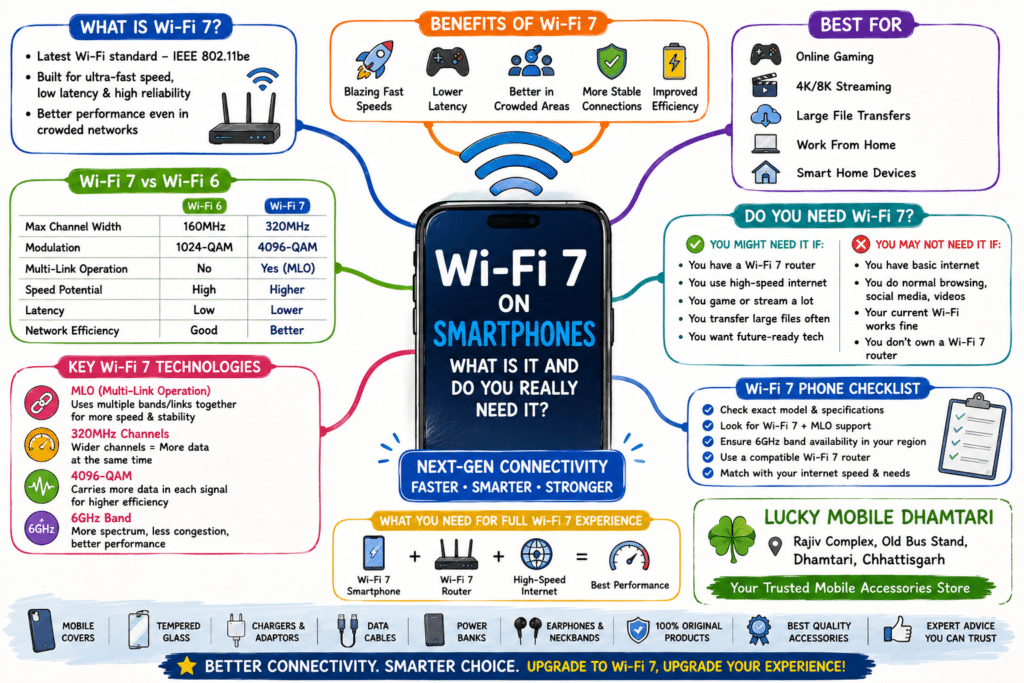
Wi-Fi 7 on Smartphones: What Is It and Do You Really Need It?
Smartphone specifications keep getting more complicated.
A few years ago, most people only cared about:
4G, 5G, Bluetooth and Wi-Fi.
Now smartphone specifications can include terms such as:
Wi-Fi 6
Wi-Fi 6E
Wi-Fi 7
MLO
6GHz
320MHz
4096-QAM
For someone buying a new smartphone, it can be difficult to understand what these terms actually mean.
So the obvious question is:
Do you really need Wi-Fi 7 on your phone?
For many users, probably not yet.
But if you have a fast internet connection, a compatible Wi-Fi 7 router and devices that can take advantage of the technology, Wi-Fi 7 can become very useful.
Let’s understand it without getting buried in technical jargon.
What Is Wi-Fi 7?
Wi-Fi 7 is the next generation of Wi-Fi technology, officially known as IEEE 802.11be.
It builds on technologies from previous Wi-Fi generations and is designed to improve:
- Speed
- Capacity
- Responsiveness
- Reliability
- Performance when multiple devices are active
One of the most important features associated with Wi-Fi 7 is Multi-Link Operation (MLO), which can allow compatible devices to use multiple Wi-Fi links more intelligently.
Wi-Fi 7 also supports technologies such as wider channels and higher-order modulation.
The important thing for smartphone buyers is:
Wi-Fi 7 is not simply “faster Wi-Fi.”
It is a collection of improvements designed to make wireless networking more capable.
Wi-Fi 7 vs Wi-Fi 6: What’s the Difference?
Let’s simplify the comparison.
| Feature | Wi-Fi 6 | Wi-Fi 7 |
|---|---|---|
| Generation | Older | Newer |
| Multi-Link Operation | No | Yes |
| Maximum channel width | Up to 160MHz | Up to 320MHz |
| Modulation | Up to 1024-QAM | Up to 4096-QAM |
| Speed potential | High | Higher |
| Latency potential | Low | Lower |
| Congested environments | Good | Designed to perform better |
| Best for | Most users | High-performance networking |
Actual performance depends on the router, smartphone, spectrum, configuration and environment.
So the specification number alone does not guarantee a specific internet speed.
Why Is Wi-Fi 7 Faster?
There isn’t one single reason.
Several technologies work together.
1. Wider 320MHz Channels
Wi-Fi 7 can support channel widths up to 320MHz where the necessary spectrum is available.
A wider channel can carry more information at once.
Think of it like a road.
A narrow road can carry fewer vehicles.
A wider road can carry more vehicles at the same time.
But the road still needs to exist.
That’s why having a Wi-Fi 7 smartphone alone doesn’t guarantee that you will automatically get maximum Wi-Fi 7 performance.
Your router and available spectrum matter too.
2. 4096-QAM
Wi-Fi 7 also introduces support for 4096-QAM, a higher-order modulation scheme compared with the 1024-QAM used by Wi-Fi 6.
In simple terms, it allows more bits of information to be represented within each transmission symbol under suitable conditions.
That can increase data efficiency.
But again, real-world performance depends on signal quality and the capabilities of the complete network.
3. Multi-Link Operation (MLO)
MLO is one of the most interesting Wi-Fi 7 features.
Instead of treating Wi-Fi connections as one simple path, compatible devices can use multiple links in a coordinated way.
This can help with:
Higher throughput
Better responsiveness
More reliable connectivity
Smoother traffic handling
MLO becomes particularly interesting when you have multiple Wi-Fi bands available and a compatible router and phone.
What Is Wi-Fi 7 MLO?
MLO stands for:
Multi-Link Operation.
Imagine your phone is connected to a Wi-Fi network with multiple available bands.
Instead of relying on only one path, MLO can coordinate multiple links.
This can be useful when:
- The network is busy
- You are moving around
- Multiple devices are active
- You need low latency
- You are transferring large files
Apple’s current documentation, for example, lists Wi-Fi 7 support with MLO on compatible iPhone models, while noting that 6GHz operation depends on regional availability.
Does Wi-Fi 7 Mean You Will Get Gigabit Internet?
Not necessarily.
This is one of the biggest misunderstandings about Wi-Fi specifications.
Your internet speed depends on several things:
Internet plan + ISP network + modem/ONT + router + phone + Wi-Fi conditions + server
Suppose your broadband connection provides 200 Mbps.
Having a Wi-Fi 7 router doesn’t magically turn your internet connection into 5 Gbps.
Wi-Fi and internet speed are related, but they are not the same thing.
Wi-Fi Speed vs Internet Speed
This is worth remembering.
Internet speed
The speed provided by your internet connection.
Wi-Fi link speed
The speed at which devices communicate with your router over Wi-Fi.
Your Wi-Fi network can have much higher theoretical capacity than your internet connection.
That extra capacity can still be useful for:
- Local file transfers
- NAS devices
- Gaming
- Media streaming
- Multiple devices
- Home networking
But it doesn’t automatically increase the speed of your ISP package.
Do You Need a Wi-Fi 7 Router?
For Wi-Fi 7 features to work fully, you generally need a compatible router or access point.
For example:
Wi-Fi 7 phone + Wi-Fi 6 router
The phone can still connect using the supported older Wi-Fi capability, but you won’t get the complete Wi-Fi 7 feature set.
Similarly:
Wi-Fi 7 router + older phone
doesn’t turn the older phone into a Wi-Fi 7 device.
The two sides need compatible hardware and features.
Samsung states this clearly in its Galaxy specifications: Wi-Fi 7 requires a Wi-Fi 7 router, and availability can vary by market and network environment.
Which Smartphones Support Wi-Fi 7?
Wi-Fi 7 has moved into an increasing number of premium smartphones.
For example, Apple’s specifications list Wi-Fi 7 on supported iPhone models, and Samsung lists Wi-Fi 7 on its newer premium Galaxy devices.
But don’t assume:
New phone = Wi-Fi 7
or:
Expensive phone = full Wi-Fi 7
Always check the exact model and regional specification.
There can also be differences in which Wi-Fi 7 features are supported.
Wi-Fi 7 on Smartphones in India
Wi-Fi 7 is becoming increasingly relevant in the Indian smartphone market.
India is also seeing greater availability of Wi-Fi 7 networking hardware.
For example, TP-Link India has announced local manufacturing of Wi-Fi 7 networking products following India’s regulatory changes around the lower 6GHz band.
But that doesn’t mean every Indian household needs Wi-Fi 7 immediately.
The value depends on your:
Broadband speed + router + devices + usage
Do You Need Wi-Fi 7 for YouTube or Netflix?
For most people:
No.
Normal video streaming does not require the full capabilities of Wi-Fi 7.
A good Wi-Fi 5, Wi-Fi 6 or Wi-Fi 6E connection can already provide plenty of performance for regular streaming.
Wi-Fi 7 becomes more interesting when several high-bandwidth devices are sharing the network or when you’re doing demanding local networking.
Is Wi-Fi 7 Good for Gaming?
This is one of the more interesting use cases.
Competitive and cloud gaming can benefit from:
Low latency
Stable connections
Reduced congestion
Reliable packet delivery
Wi-Fi 7’s MLO and other improvements are designed to improve responsiveness and traffic handling.
However, a Wi-Fi 7 label does not automatically mean lower gaming ping.
Your:
- ISP
- Game server location
- Router
- Network congestion
- Device
- Wi-Fi environment
all matter.
A good Wi-Fi 6 setup can still offer excellent gaming performance.
Wi-Fi 7 for Cloud Gaming
Cloud gaming depends heavily on a reliable network.
You’re sending controller input to a remote server and receiving the game video back.
Small latency changes can affect the experience.
Wi-Fi 7 can be useful here, particularly on a well-designed network with compatible equipment.
But remember:
Wi-Fi 7 cannot fix a poor internet connection.
If your ISP has high latency or an unstable connection, upgrading only your Wi-Fi won’t solve everything.
Wi-Fi 7 for Large File Transfers
This is where faster Wi-Fi can be genuinely useful.
Imagine transferring a large video file:
Phone → Laptop
or:
Phone → NAS
or:
Laptop → Desktop
When the devices are on the same local network, your wireless network can become an important bottleneck.
A capable Wi-Fi 7 setup can offer considerably more local-network capacity than older generations.
This can matter to:
- Content creators
- Photographers
- Video editors
- Professionals
- Heavy home-network users
What Is 6GHz Wi-Fi?
You may hear Wi-Fi 7 and 6GHz mentioned together.
The 6GHz band provides additional spectrum for compatible Wi-Fi systems.
This can help reduce congestion and provide wider channels in supported regions.
But here’s the important part:
6GHz availability depends on local regulations.
Apple’s current documentation notes that Wi-Fi 7 devices can operate across 2.4GHz, 5GHz and 6GHz, but 6GHz availability depends on the region.
Therefore, don’t assume every Wi-Fi 7 phone or router will operate identically in every country.
Can a Wi-Fi 7 Phone Connect to Wi-Fi 6?
Yes.
Wi-Fi generations are designed with backward compatibility in mind.
So a Wi-Fi 7 smartphone can connect to an older compatible Wi-Fi network.
But the connection will operate according to the capabilities of the network and device combination.
For example:
Wi-Fi 7 phone + Wi-Fi 6 router
doesn’t give you the full Wi-Fi 7 experience.
Do You Need Wi-Fi 7 on Your Next Smartphone?
Let’s make it simple.
You probably don’t need Wi-Fi 7 if:
- You use normal home broadband
- You mostly browse social media
- You watch videos
- You use WhatsApp
- You rarely transfer large files
- Your current Wi-Fi works perfectly
- You don’t own a Wi-Fi 7 router
Wi-Fi 7 may be worth considering if:
- You have very fast broadband
- You use many connected devices
- You transfer large files regularly
- You are a serious gamer
- You use cloud gaming
- You have a Wi-Fi 7 router
- You want a phone with newer connectivity hardware
- You expect to keep the phone for several years
Is Wi-Fi 7 Worth Paying Extra For?
This is where our buying advice becomes important.
Don’t pay a large premium just because the box says:
Wi-Fi 7
If everything else about the phone is weaker, it may not be worth it.
Instead compare:
Processor
Display
Camera
Battery
Charging
Software support
Storage
5G
Wi-Fi
Build quality
Wi-Fi 7 should be one part of the decision, not the entire decision.
Wi-Fi 7 Smartphone Buying Checklist
Before buying a Wi-Fi 7 phone, check:
✅ Exact model
Different versions can have different connectivity specifications.
✅ Wi-Fi bands
Check which bands the phone supports.
✅ MLO support
A Wi-Fi 7 label doesn’t tell you every feature by itself.
✅ Router compatibility
Your router should support the features you want.
✅ 6GHz availability
Check whether the relevant band is available in your region.
✅ Internet plan
A very fast Wi-Fi system can’t increase a slow broadband connection.
✅ Real-world use
Think about how you actually use your phone.
Common Wi-Fi 7 Mistakes
Mistake 1: Buying a Wi-Fi 7 phone without a Wi-Fi 7 router
You may not benefit from the newer features at home.
Mistake 2: Thinking Wi-Fi 7 increases your mobile data speed
Wi-Fi and 5G are different technologies.
Mistake 3: Thinking Wi-Fi 7 always means lower ping
Network conditions still matter.
Mistake 4: Buying based only on theoretical speed
Real-world performance depends on the entire network.
Mistake 5: Ignoring your broadband plan
A slow internet plan remains a slow internet plan.
Wi-Fi 7 vs 5G: Are They the Same?
No.
This is another common confusion.
5G
A cellular network technology provided by your mobile operator.
Wi-Fi 7
A local wireless networking technology used to connect devices to a router or access point.
Your phone can use:
5G outside
and:
Wi-Fi 7 at home or work
They solve different problems.
Will Wi-Fi 7 Make Your Phone Battery Drain Faster?
It depends on how the phone and network use the connection.
Wireless networking consumes power, but efficiency varies with:
- Signal strength
- Data activity
- Wi-Fi band
- Network conditions
- Device hardware
- Software
You shouldn’t buy or reject a smartphone solely because it has Wi-Fi 7.
Battery life is affected by many other components and usage patterns.
Why Wi-Fi 7 Matters for Future Smartphones
The biggest reason to care about Wi-Fi 7 may not be what it does today.
It is about preparing smartphones for increasingly demanding wireless use.
Smartphones are becoming more connected to:
- Cloud services
- AI tools
- Large media libraries
- Smart-home devices
- Gaming platforms
- Wireless displays
- High-resolution video
- Local computers and storage
As home networks become faster and more crowded, stronger wireless connectivity becomes more useful.
⭐ Lucky Mobile Dhamtari-Our Wi-Fi 7 Buying Tip
If you’re comparing smartphones at a smartphone shop in Dhamtari, don’t buy a phone simply because it has Wi-Fi 7 printed in the specifications.
First ask yourself:
Do I have a fast enough internet connection?
Do I have a Wi-Fi 7 router?
Do I transfer large files?
Do I need extremely low latency for gaming?
If the answer to most of these is no, then other smartphone features may provide much more value.
But if you’re buying a premium phone and want newer connectivity technology for the long term, Wi-Fi 7 can be a useful feature to have.
For buyers looking for a mobile shop in Dhamtari or mobile accessories in Dhamtari, Lucky Mobile is located at:
Lucky Mobile
Rajiv Complex, Old Bus Stand, Dhamtari, Chhattisgarh
⭐ Lucky Mobile Dhamtari FAQ
Where is Lucky Mobile located in Dhamtari?
Lucky Mobile is located at Rajiv Complex, Old Bus Stand, Dhamtari, Chhattisgarh.
Can I buy mobile accessories at Lucky Mobile Dhamtari?
Yes, Lucky Mobile offers mobile accessories such as mobile covers, tempered glass, chargers, data cables, power banks and earbuds, subject to availability.
Can I buy tempered glass for a new Wi-Fi 7 smartphone?
Yes. You can visit Lucky Mobile with your smartphone model and check the available screen-protection options.
Does Lucky Mobile sell chargers and USB-C cables?
Yes, you can visit Lucky Mobile to check available chargers and USB-C/data cables suitable for compatible smartphones.
Can Lucky Mobile help me choose accessories for a new smartphone?
Yes. Tell us your smartphone model and your requirements, and we can help you choose suitable accessories.
Related Article
- AMOLED vs OLED vs LCD
- 120Hz vs 144Hz vs 165Hz
- Why Smartphone Cameras Are Moving Beyond Megapixels
- Variable Aperture Smartphone Cameras
- Periscope Cameras Explained
- USB-C Charger vs USB-C Cable
- Fast Charging vs Battery Health
- Mobile Covers
- Tempered Glass
- Mobile Chargers & Adaptors
Suggested Products
1. Wi-Fi 7 Smartphone
2. Wi-Fi 7 Router
3. USB-C Fast Charging Cable
4. USB-C Fast Charger
5. Premium Mobile Cover
6. Tempered Glass
Affiliate Disclosure
This article may contain affiliate links. If you purchase a product through these links, Lucky Mobile may earn a small commission at no additional cost to you.
Always check the manufacturer’s latest specifications, compatibility and seller information before purchasing.
Final Verdict: Do You Really Need Wi-Fi 7?
For most smartphone users, Wi-Fi 7 is a useful future-facing feature rather than a must-have feature.
If your current Wi-Fi works well and your internet connection isn’t extremely fast, you may not notice a dramatic difference.
But for power users, gamers, content creators and people with fast home networks, Wi-Fi 7 can become much more useful.
The key is to remember:
Wi-Fi 7 phone + Wi-Fi 7 router + suitable internet connection = where the technology makes the most sense.
A phone with Wi-Fi 7 is not automatically a better phone.
Choose the complete package.
Better Connectivity. Smarter Choice.
Lucky Mobile Dhamtari
Rajiv Complex, Old Bus Stand, Dhamtari, Chhattisgarh
Your Trusted Mobile Accessories Store