
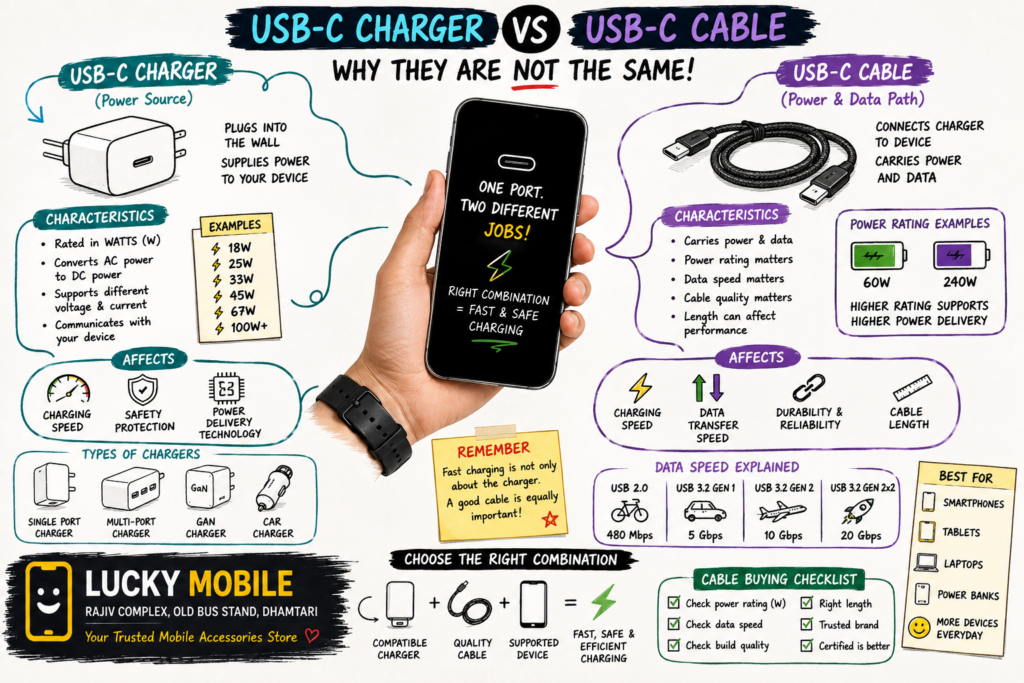
USB-C Charger vs USB-C Cable: Why They Are Not the Same
If you have recently bought a smartphone, you have probably noticed one thing: almost everything is becoming USB-C.
Phones, tablets, power banks, earbuds, laptops and even some accessories now use USB-C. But there is one common confusion.
If my charger is 67W, why doesn’t every USB-C cable charge my phone at 67W?
The answer is simple: the charger and the cable do different jobs.
A charger supplies power. A cable carries that power from the charger to your phone. Your phone then decides how much power it can safely accept.
So, buying a powerful charger is only one part of getting fast charging.
Let’s understand the difference in simple language.
What Is a USB-C Charger?
A USB-C charger is the power adapter that connects to your wall socket.
Its job is to convert electricity from the wall into the appropriate power output for your device.
You may see chargers advertised as:
- 18W
- 20W
- 25W
- 33W
- 45W
- 67W
- 80W
- 100W
- 120W and more
But a higher wattage number does not automatically mean your phone will charge at that speed.
For example, if your smartphone supports a maximum charging speed of 33W, connecting it to a 100W charger does not necessarily make the phone charge at 100W.
The phone, charger and charging system have to be compatible.
Modern USB Power Delivery systems can negotiate power so that a device receives the power it is designed to use rather than simply taking the maximum available power.
What Is a USB-C Cable?
A USB-C cable is the physical cable connecting two devices.
For example:
Charger → USB-C cable → Smartphone
The cable carries both power and, depending on its design, data.
This is where things become confusing.
Two cables can look almost identical but have different capabilities.
One cable may be designed mainly for basic charging and USB 2.0 data speeds, while another may support higher power and much faster data transfer.
That is why simply seeing a USB-C connector does not tell you everything about the cable.
USB-C Charger vs USB-C Cable: The Basic Difference
| Feature | USB-C Charger | USB-C Cable |
|---|---|---|
| Main job | Supplies power | Carries power and data |
| Connected to | Wall socket | Charger and device |
| Usually rated in | Watts (W) | Power capability + data speed |
| Controls power output | Yes | Carries the negotiated power |
| Affects charging speed | Yes | Yes |
| Affects data transfer | Usually through its ports/standard | Yes |
| Can look different internally | Yes | Yes |
| Can support different standards | Yes | Yes |
The easiest way to remember it is:
Charger = power source
Cable = power and data pathway
Phone = device that controls what it actually uses
Why a Good USB-C Cable Matters
Imagine you have a fast charger and a smartphone capable of fast charging.
You connect an old, poor-quality or unsuitable cable.
The result may be slower charging than expected.
This is one reason people sometimes say:
“My charger says 67W, but my phone is charging slowly.”
The charger may not be the problem.
The cable could be one of the limiting factors.
A quality cable should be suitable for the power requirement of your device and charger.
For USB-C to USB-C cables, USB-IF certification markings can help identify power capabilities. USB-IF currently uses power markings such as 60W and 240W for certified USB-C to USB-C cable categories, along with data-rate information on applicable cables.
Does Every USB-C Cable Support Fast Charging?
No.
This is one of the biggest misconceptions about USB-C.
USB-C refers to the connector design. It does not mean every USB-C cable has exactly the same capabilities.
Some cables are intended for basic charging and data.
Others are designed for higher-power charging.
Some also support much faster data transfer.
So when buying a cable, don’t look only at:
“USB-C to USB-C”
Also check:
- Supported power rating
- Data-transfer capability
- Cable quality
- Compatibility with your charger
- Compatibility with your phone
- Manufacturer specifications
- Certification markings where applicable
60W vs 240W USB-C Cables
You may notice USB-C cables advertised with power ratings such as 60W or 240W.
These ratings describe the cable’s power capability, not how much power your phone will automatically receive.
For example, a 240W-rated cable does not force a smartphone to charge at 240W.
The actual charging speed depends on the complete charging system:
Phone + charger + cable + charging protocol
A phone that supports only 25W charging will still operate around its supported charging limit even if you connect a higher-rated cable and charger.
What About 100W USB-C Cables?
This is another area where specifications can become confusing.
Older USB Power Delivery implementations supported power levels up to 100W, while USB PD 3.1 introduced Extended Power Range with support up to 240W over appropriate USB-C cables.
For normal smartphone users, you usually don’t need to buy an extremely high-power cable simply because it has a larger number on the box.
Choose the cable according to your actual device and charger requirements.
USB-C Cable Also Affects Data Transfer
USB-C cables aren’t only about charging.
They can also transfer data.
This becomes important when you connect your phone to:
- A laptop
- Desktop computer
- External SSD
- Monitor
- Camera
- Tablet
- Docking station
A cable may charge your phone perfectly well but still have limited data-transfer capability.
For example, you might buy a USB-C cable thinking it will transfer large files very quickly, only to discover that its data specification is much slower than the port on your computer.
So remember:
Fast charging cable ≠ automatically fast data cable
Always check both specifications when data performance matters.
How to Choose the Right USB-C Cable for Your Phone
Before buying a cable, follow these simple steps.
1. Check Your Phone’s Maximum Charging Speed
First find out how fast your phone actually supports charging.
If your phone supports 25W charging, you don’t necessarily need an extremely high-power cable.
If your phone supports 80W, 100W or another higher charging level, pay more attention to the cable’s power capability.
2. Check Your Charger
Look at the output specifications printed on your charger.
A charger may support different output modes depending on the device and charging protocol.
Don’t assume that the biggest wattage printed on the charger will always be delivered to your phone.
3. Buy a Cable From a Reliable Brand
Very cheap cables can be tempting, especially when you see similar-looking products online.
But charging accessories are not a good place to compromise heavily on quality.
Look for:
- Proper specifications
- Reliable connectors
- Strong cable construction
- Clear power rating
- Trusted manufacturer
- Appropriate certification where applicable
4. Check the Cable Length
Longer is not always better.
A 1m cable is convenient for normal charging.
A 1.5m or 2m cable can be useful beside a bed or desk.
For high-power applications, however, always check that the cable is actually rated for the intended use.
5. Don’t Forget Data Speed
If you only need charging, your requirements may be simple.
But if you regularly transfer large videos, photos or files, check the cable’s data-transfer specification too.
Can a Higher-Watt Charger Damage Your Phone?
Not simply because the number is higher.
A compatible charging system is designed to negotiate an appropriate power level.
For example, using a higher-rated charger with a phone that supports a lower charging level does not mean the phone is automatically forced to consume the charger’s maximum wattage.
However, using poor-quality, incompatible or counterfeit charging accessories is a different matter.
This is why buying from a reliable source matters.
Why Your Phone May Still Charge Slowly
If you have a fast charger but charging seems slow, check these things:
Phone temperature
Phones can reduce charging speed when they become hot.
Battery level
Charging speed may change as the battery gets closer to full.
Charger compatibility
The charger may not support the charging standard required by your phone.
Cable capability
The cable may not support the required power level.
Phone usage
Gaming, video recording or other heavy tasks while charging can affect charging behaviour and heat.
Poor-quality accessory
An unreliable charger or cable can cause inconsistent performance.
USB-C Charger vs USB-C Cable: Simple Example
Imagine you have a phone that supports fast charging.
You buy:
Fast charger + good compatible cable + compatible phone
Everything works as expected.
Now replace the cable with a poor-quality cable.
The charger is still fast.
The phone is still fast.
But the complete charging setup may no longer deliver the expected performance.
That’s why buying only a powerful charger isn’t always enough.
Do You Need a USB-C to USB-C Cable?
For many newer devices, USB-C to USB-C is becoming the most useful cable type.
It can connect:
USB-C charger → USB-C phone
It can also be useful for tablets, laptops, power banks and other USB-C devices.
However, don’t buy one simply because it is USB-C to USB-C.
Check the power and data specifications as well.
USB-C Cable Buying Checklist
Before purchasing a new cable, ask:
✔ Is it compatible with my phone?
✔ Does it support my phone’s charging requirement?
✔ Is the cable power rating clearly mentioned?
✔ Is the manufacturer trustworthy?
✔ Do I need fast data transfer?
✔ Is the connector construction strong?
✔ Is the cable length suitable for my use?
✔ Does it have appropriate certification or clear technical specifications?
This small checklist can save you from buying the wrong cable.
Original Cable vs Cheap Duplicate Cable
The cheapest cable is not always the best deal.
A cable is something you may connect and disconnect hundreds or thousands of times.
Poor connectors can loosen.
Weak cables can bend near the plug.
Unclear specifications can create charging problems.
Instead of choosing purely by price, look at the combination of:
Quality + compatibility + power rating + durability
That’s a much better way to buy.
⭐ Lucky Mobile Dhamtari — Our USB-C Cable Tip
If you’re buying a fast charger for your smartphone, don’t forget to check the cable at the same time.
At Lucky Mobile, you can ask which cable is suitable for your phone and charger combination.
If your phone supports high-speed charging, tell us the exact phone model before buying the cable.
That way, you can choose a cable based on the phone’s actual requirement instead of simply buying the cheapest USB-C cable available.
Lucky Mobile
Rajiv Complex, Old Bus Stand, Dhamtari, Chhattisgarh
Your Trusted Mobile Accessories Store
⭐ Lucky Mobile Dhamtari FAQ
Where is Lucky Mobile located in Dhamtari?
Lucky Mobile is located at Rajiv Complex, Old Bus Stand, Dhamtari, Chhattisgarh.
Can I buy USB-C cables at Lucky Mobile Dhamtari?
Yes, you can visit Lucky Mobile to check available USB-C cables and other mobile accessories.
Can Lucky Mobile help me choose a cable for my phone?
Yes. You can bring or tell us your phone model and we can help you choose a suitable charging cable.
Does Lucky Mobile sell other mobile accessories?
Yes. Lucky Mobile offers various mobile accessories including chargers, cables, tempered glass, mobile covers, power banks, earbuds and other accessories.
- Mobile Chargers & Adaptors
- Data Cables
- Power Banks
- Wireless Earbuds
- Mobile Accessories Buying Guide
- Fast Charging vs Battery Health
Suggested Products
1. USB-C to USB-C Fast Charging Cable
Affiliate Disclosure
This article may contain affiliate links. If you purchase a product through these links, Lucky Mobile may earn a small commission at no additional cost to you. We recommend checking the product specifications and compatibility before purchasing.
Final Thoughts
USB-C has made charging much more convenient, but it has also created a new problem: many USB-C accessories look similar even when their capabilities are different.
The most important thing to remember is that your charger and cable are two separate parts of the charging system.
A powerful charger cannot magically turn every cable into a fast-charging cable.
Before buying, check the phone’s charging capability, charger output, cable power rating and data requirements.
And if you’re unsure, don’t guess.
Ask for the right cable for your specific phone.
Right Charger. Right Cable. Right Choice.
That’s the easiest way to get reliable charging from your smartphone.