
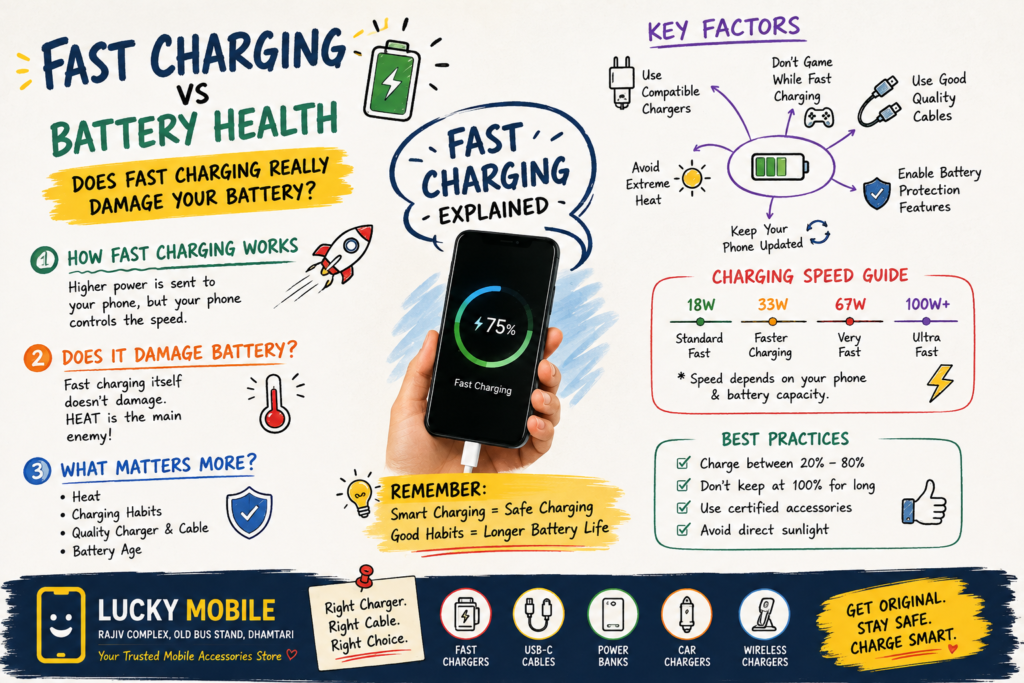
Does Fast Charging Really Damage Your Smartphone Battery?
Fast charging has become one of the most useful features on modern smartphones.
Instead of waiting for hours to charge your phone, you can connect a compatible charger and get a significant amount of battery power in a much shorter time.
Today, smartphones support different charging speeds, from basic charging to high-speed charging technologies.
But one question continues to come up:
Does fast charging damage your smartphone battery?
The short answer is:
Fast charging can contribute to battery wear over time, but modern smartphones are designed to manage fast charging safely. Heat, charging habits and battery age are often more important factors than simply the advertised charging wattage.
Let’s understand what actually happens when you plug your smartphone into a fast charger.
What Is Fast Charging?
Fast charging means charging a smartphone at a higher power level than traditional basic charging.
Charging power is generally measured in watts (W).
For example, you may see chargers advertised as:
- 18W
- 20W
- 25W
- 33W
- 45W
- 67W
- 80W
- 100W or more
But a higher wattage does not automatically mean that your phone will charge at that speed.
The smartphone determines how much power it can safely accept.
For example, connecting a 100W charger to a phone that supports a lower charging power does not automatically force 100W into the phone.
The phone and charger communicate and manage the charging process according to supported charging standards and the device’s charging system.
How Does Smartphone Fast Charging Work?
Fast charging isn’t simply about sending maximum power into the battery from beginning to end.
The charging system continuously manages:
- Voltage
- Current
- Temperature
- Battery percentage
- Charging speed
- Battery condition
When the battery is low, the phone may accept higher charging power.
As the battery approaches a higher charge level, charging speed generally reduces.
This is why the first part of a fast charge can feel extremely quick, while the final portion takes longer.
This charging strategy helps balance speed, heat and battery longevity.
Does Fast Charging Damage Your Battery?
Fast charging itself should not be treated as something that automatically destroys a battery.
Modern smartphones are designed with battery-management systems that control charging.
However, charging at higher power can generate additional heat.
And excessive heat is one of the biggest enemies of lithium-ion battery longevity.
This means the more useful question isn’t:
“Is fast charging bad?”
Instead, ask:
“How well does the phone manage heat and charging?”
A properly designed smartphone, compatible charger and good-quality cable can work together to provide fast charging while managing these risks.
Why Heat Matters More Than Charging Speed
Battery chemistry is sensitive to temperature.
When a smartphone becomes very hot during charging, especially repeatedly, it can contribute to faster battery degradation.
Heat can come from several sources:
- Fast charging
- Gaming while charging
- Direct sunlight
- Hot environments
- Poor ventilation
- Heavy processing
- Damaged chargers or cables
This is why your phone may slow down charging when it becomes too warm.
The phone’s charging system can reduce power to control temperature.
So if you want to protect battery health, controlling unnecessary heat is one of the most important things you can do.
18W vs 33W vs 67W vs 100W Charging
Here’s a simple way to understand charging speeds:
| Charging Power | General Idea |
|---|---|
| 18W | Standard fast charging for many phones |
| 25W | Faster charging for compatible devices |
| 33W | Faster mid-range charging |
| 45W | High-speed charging |
| 67W | Very fast charging |
| 80W+ | High-speed charging on supported devices |
| 100W+ | Very high-speed charging on compatible devices |
These numbers should not be used to compare phones directly without considering battery size and charging technology.
A 67W charger on one smartphone may behave differently from a 67W charger on another.
The phone’s battery capacity, charging protocol, thermal management and manufacturer implementation all matter.
What Happens When Your Battery Reaches 80%?
Charging isn’t equally fast throughout the entire battery cycle.
When a battery is at a low charge level, the phone can generally accept more charging power.
As the battery gets closer to full capacity, the charging system reduces power.
This helps manage:
- Heat
- Voltage
- Battery stress
- Charging safety
That’s why you may see your phone charge very quickly from a low percentage to around the middle of the battery, but take considerably longer to reach 100%.
What Is a Battery Charging Cycle?
A charging cycle does not simply mean plugging your phone into a charger once.
One complete cycle generally represents the equivalent of using 100% of the battery’s capacity, although this can happen across multiple partial charges.
For example:
If you use 50% of your battery today and recharge it, then later use another 50%, those two periods together represent approximately one full cycle.
Modern lithium-ion batteries are designed to handle many cycles, but battery capacity gradually decreases with age and use.
This is normal.
No battery remains at its original capacity forever.
Does Charging From 0% to 100% Matter?
You don’t need to completely drain a modern smartphone battery before charging it.
In fact, regularly allowing a phone to reach extremely low levels can be unnecessary.
Likewise, keeping a battery at maximum charge for long periods can contribute to battery ageing.
Many smartphones now offer battery-protection features such as:
- Optimised charging
- Adaptive charging
- Charge limits
- Battery protection modes
The exact features depend on the smartphone manufacturer and software.
Does Overnight Charging Damage Your Phone?
Modern smartphones are designed to manage charging automatically.
When the battery reaches its target charge level, the charging system doesn’t simply continue pushing maximum power into the battery.
Many modern phones also provide charging optimisation features that can adjust charging behaviour based on your habits.
However, there is still a good reason to avoid unnecessary heat.
If your phone becomes hot while charging overnight because it is under a pillow, inside a thick insulating environment or exposed to a hot room, that is not ideal.
A better practice is to charge the phone on a hard, open surface where heat can dissipate.
Can You Use Your Phone While Charging?
Yes, but what you’re doing matters.
Light activities such as:
- Messaging
- Reading
- Browsing
generally produce much less heat than demanding activities.
Gaming while fast charging is different.
Gaming can simultaneously put heavy demands on:
- CPU
- GPU
- Display
- Network
- Battery
This can increase heat significantly.
If your phone gets noticeably hot during charging, especially while gaming, it is better to reduce the workload and allow the device to cool.
Why Original and Compatible Chargers Matter
A charger is not just a box that supplies electricity.
Modern chargers use charging protocols and communication between the charger and smartphone.
A good charger should provide the appropriate:
- Voltage
- Current
- Charging protocol
- Safety protections
Using an extremely cheap or poorly manufactured charger can introduce unnecessary risks.
For a fast-charging smartphone, choose a charger that is compatible with the phone’s supported charging technology.
USB-C Charger vs USB-C Cable — What’s the Difference?
This is an important point because many people assume all USB-C accessories are identical.
They are not.
USB-C describes the connector shape.
It does not automatically mean that every USB-C cable supports the same:
- Charging power
- Data speed
- USB standard
- Video capability
For example, one USB-C cable may be designed primarily for charging, while another may support higher power and faster data transfer.
Therefore, when buying a fast charger, don’t forget about the cable.
Can a Higher-Watt Charger Damage Your Phone?
Not simply because its maximum wattage is higher.
The phone normally negotiates an appropriate charging level with a compatible charger.
For example, if your smartphone supports a lower charging power, connecting it to a higher-rated compatible charger does not mean the phone will automatically receive the charger’s maximum rated power.
The important word is:
Compatible.
The charger, cable and smartphone should support an appropriate charging protocol.
When in doubt, check the phone manufacturer’s specifications or ask a knowledgeable mobile-accessory seller.
Does Fast Charging Reduce Battery Life?
Battery capacity naturally decreases as a lithium-ion battery ages.
Fast charging can contribute to battery stress primarily through factors such as heat and charging conditions.
But modern charging systems are designed to manage these factors.
Real-world battery ageing depends on many variables:
- Temperature
- Charging frequency
- Usage
- Charging speed
- Battery chemistry
- Phone design
- Software
- Battery age
Therefore, it would be incorrect to say:
“Fast charging always destroys batteries.”
It would also be incorrect to say:
“Fast charging has absolutely no effect on battery ageing.”
The reality is somewhere in between.
How to Keep Your Smartphone Battery Healthy
You don’t need complicated rules.
Follow a few simple habits.
1. Avoid Excessive Heat
Don’t leave your phone in direct sunlight or extremely hot places.
2. Use a Compatible Charger
Choose a charger designed to work with your smartphone.
3. Use a Good-Quality Cable
Especially when using high-speed charging.
4. Avoid Heavy Gaming While Charging
This can create additional heat.
5. Keep Charging Ports Clean
Dust and debris can interfere with charging connections.
6. Use Battery Protection Features
If your phone provides adaptive or optimised charging, consider enabling it.
7. Don’t Worry About Charging at 20% or 40%
You don’t need to wait until the battery reaches zero.
8. Don’t Obsess Over 100%
Occasionally charging to 100% is normal. The goal is to avoid unnecessary heat and prolonged stressful conditions.
Fast Charging for Gaming Phones
Gamers should pay special attention to thermal management.
Gaming can already generate significant heat.
If you combine:
Heavy gaming + fast charging + hot environment
the phone can become much warmer.
If you need to charge while gaming, consider reducing the workload or using a charging mode designed to manage heat if your phone provides one.
A good gaming smartphone should have proper thermal management, not just a large battery and high charging wattage.
Fast Charging on iPhone vs Android
Charging technology differs between manufacturers and models.
Many newer iPhones use USB-C, while Android smartphones have used USB-C extensively across different price segments.
However, USB-C does not mean identical charging performance.
Different phones can support different:
- Charging speeds
- Power levels
- Charging protocols
- Cable requirements
This is why you should always check the exact phone model before buying a charger or cable.
For Apple devices in particular, a USB-C connector does not mean every USB-C accessory provides the same charging or data capabilities.
Should You Buy a 100W Charger?
It depends on your devices.
A high-power charger can be useful if you have devices that support high-speed charging.
For example, one charger may be able to charge:
- Smartphone
- Tablet
- Laptop
- Wireless accessories
A multi-port GaN charger can also be convenient for travel or work.
But buying the highest-wattage charger available isn’t necessary for everyone.
Choose according to your actual devices and charging requirements.
What About Power Banks With Fast Charging?
Modern power banks can also support fast charging.
When choosing one, check:
- Capacity
- Output power
- USB-C support
- Supported charging protocols
- Number of ports
- Safety features
- Cable compatibility
A power bank with a large capacity isn’t automatically the best choice.
The output capability should match your smartphone’s requirements.
Common Fast-Charging Mistakes to Avoid
Mistake 1: Buying the Cheapest Charger
A low price does not guarantee good quality.
Mistake 2: Assuming Every USB-C Cable Is the Same
Connector shape does not determine charging or data capability.
Mistake 3: Gaming Intensively While Fast Charging
This can generate significant heat.
Mistake 4: Leaving Your Phone in Direct Sunlight
Charging plus environmental heat is an unnecessary combination.
Mistake 5: Buying a Charger Only Because It Says “100W”
Compatibility matters more than a large number printed on the box.
Mistake 6: Ignoring Damaged Cables
Replace cables that are damaged, frayed or physically compromised.
Fast Charging vs Battery Health: The Simple Answer
| Question | Answer |
|---|---|
| Is fast charging automatically bad? | No |
| Can fast charging create more heat? | Yes |
| Is heat important for battery health? | Yes |
| Can modern phones manage charging automatically? | Yes |
| Is a higher-watt charger always faster? | No |
| Are all USB-C cables identical? | No |
| Should you use compatible chargers? | Yes |
| Should you avoid extreme heat? | Yes |
| Is battery ageing normal? | Yes |
| Should you worry about using fast charging? | No, when using compatible equipment properly |
The biggest lesson is simple:
Fast charging is a convenience. Good charging habits help protect battery health.
⭐ Lucky Mobile Dhamtari Buying Tip
When buying a charger or USB-C cable, don’t choose it only because the package says “Fast Charging.”
First check your smartphone model.
Then check:
- Supported charging speed
- Charging protocol
- Cable requirements
- Charger compatibility
- Number of devices you need to charge
- Whether you need a compact travel charger
- Whether you need a multi-port charger
At Lucky Mobile Dhamtari, you can bring your smartphone or tell us your exact model so the appropriate charging accessory can be selected.
The right charger is the one that matches your device — not simply the one with the biggest wattage number.
FREQUENTLY ASKED QUESTIONS (FAQ)
⭐ Can Lucky Mobile Dhamtari help me choose a fast charger?
Yes. Tell us your smartphone model and charging requirements, and we can help you select a compatible charger.
⭐ Does Lucky Mobile sell USB-C fast-charging cables?
Yes. Lucky Mobile offers USB-C cables and other charging accessories, subject to availability.
⭐ Can I get a charger for my iPhone at Lucky Mobile Dhamtari?
Yes. Bring your exact iPhone model so the correct compatible charging accessory can be selected.
⭐ Can I buy a high-wattage charger from Lucky Mobile?
You can ask Lucky Mobile about available high-power chargers and check compatibility with your smartphone and other devices.
⭐ Does Lucky Mobile sell power banks?
Yes. Power banks are among the mobile accessories available at Lucky Mobile Dhamtari.
⭐ Can Lucky Mobile help me choose a charger for multiple devices?
Yes. Tell us which devices you want to charge, and we can help you compare suitable multi-port charging options.
⭐ Does Lucky Mobile sell mobile covers and tempered glass?
Yes. Lucky Mobile offers mobile covers and tempered-glass options for different smartphone models, subject to availability.
⭐ Where is Lucky Mobile Dhamtari located?
Lucky Mobile is located at:
Rajiv Complex, Old Bus Stand, Dhamtari, Chhattisgarh.
📍 Visit Lucky Mobile Dhamtari
LUCKY MOBILE
Rajiv Complex,
Old Bus Stand,
Dhamtari, Chhattisgarh.
Looking for smartphones, chargers, USB-C cables, power banks, mobile covers, tempered glass or other mobile accessories?
Visit Lucky Mobile and choose accessories according to your smartphone and everyday requirements.
Final Thoughts
Fast charging has changed the way we use smartphones.
Nobody wants to wait for hours when their phone battery is low.
Modern charging technology allows smartphones to recover a significant amount of battery power in a relatively short period.
But fast charging should be used intelligently.
The most important things to remember are:
Use a compatible charger.
Use a good-quality cable.
Avoid excessive heat.
Don’t regularly put your phone through unnecessary thermal stress.
Use battery-protection features when available.
And don’t worry every time you connect your phone to a fast charger.
Battery ageing is a normal part of using a lithium-ion smartphone battery.
The goal isn’t to prevent battery ageing completely — that isn’t possible.
The goal is to avoid unnecessary stress and keep your battery performing well for as long as possible.
So, does fast charging damage your battery?
It can contribute to battery wear under certain conditions, particularly when heat is involved, but modern smartphones are designed to manage fast charging safely when used with compatible charging equipment.
For smartphones and mobile accessories in Dhamtari, visit:
Lucky Mobile, Rajiv Complex, Old Bus Stand, Dhamtari.
AFFILIATE DISCLOSURE
Some links in this article may be affiliate links. If you purchase a product through an affiliate link, Lucky Mobile may earn a commission at no additional cost to you. This helps support our website.
SUGGESTED INTERNAL LINKS
Blog → USB Type-C Explained: Charging, Data and Compatibility
Blog → Silicon-Carbon Batteries Explained: Why New Smartphones Are Getting Bigger Batteries
Blog #17 → Why Smartphone Batteries Are Getting Bigger Without Making Phones Huge
Blog #14 → 7 Must-Have Mobile Accessories for Your New Smartphone