
iOS 27 Launch: Expected Features, Supported Devices, and Performance Verdict
Every September, millions of iPhone owners face the exact same question: should I hit update right away, or wait a few weeks until the early bugs get sorted out?
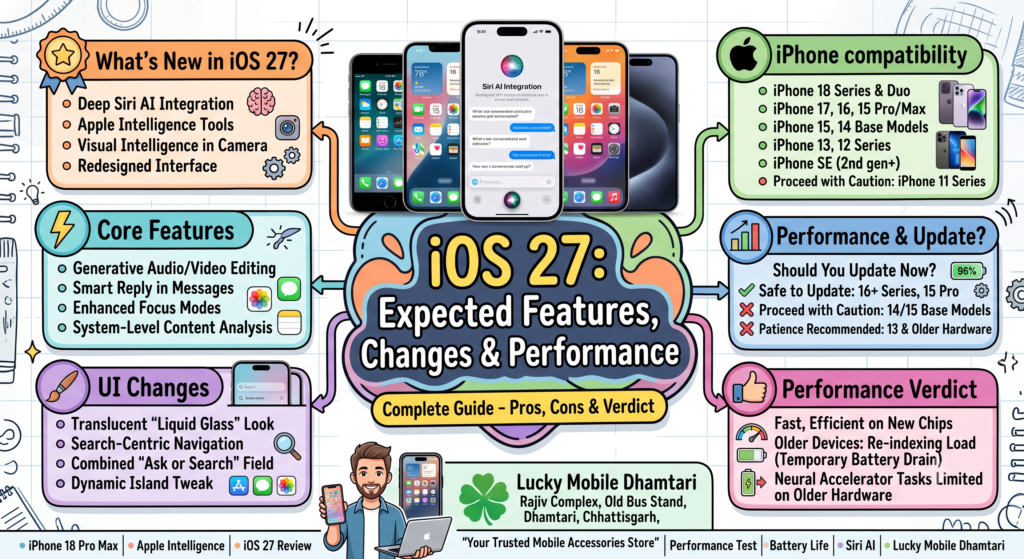
With Apple officially rolling out iOS 27 alongside the new iPhone 18 lineup, the spotlight is firmly on whether this year’s release is a must-have upgrade or another battery-draining hazard for older devices. Following last year’s naming reset that unified version numbers with the calendar release cycle, iOS 27 brings deeper system-level generative tools, a reworked Siri built in partnership with cloud AI infrastructure, and noticeable adjustments to daily navigation.
Before you tap that install button in your settings menu, here is an honest look at what has changed under the hood, which iPhones will actually handle it smoothly, and which older handsets are better off skipping the initial push.
Quick Overview: Who Gets What on iOS 27
iPhone Generation | Core iOS 27 Updates | Apple Intelligence & Siri AI | Performance Recommendation
iPhone 17 & 18 Series | Full support | Full on-device & private cloud | Safe to update immediately
iPhone 16 Series & 15 Pro / Max | Full support | Supported | Safe to update
iPhone 15 & 14 Series | Full interface & app features | Limited / Cloud-only | Safe, but wait for first bug-fix patch
iPhone 13 & 12 Series | Security & base app tweaks | Not supported | Wait for battery feedback before updating
iPhone 11 Series & SE (2nd/3rd Gen) | Security & baseline features | Not supported | Proceed with caution; watch for storage limits
Key Features Arriving with iOS 27
1. Rebuilt Siri AI and Screen Awareness
The biggest change in iOS 27 centers around Apple’s virtual assistant. Siri is no longer just answering web searches with simple links. The rebuilt assistant operates more like a genuine conversational partner, tracking context across multiple questions without losing your train of thought.
More importantly, it gains on-screen awareness. If a friend sends you an address in WhatsApp or an event flyer in Photos, you can ask Siri to “add this to my calendar” without manually typing dates, times, or venues. For devices with the Dynamic Island, Siri now tucks into the pill cutout directly instead of blocking the entire screen with a floating orb.
2. Native Generative Tools in the Camera and Photos
Apple has integrated visual intelligence directly into the Camera app viewfinder. Pointing your lens at a product, plant, or business storefront allows the system to pull details, business hours, or similar items instantly without launching third-party apps.
Inside Photos, cleanup and reconstruction tools have expanded. Beyond erasing stray photobombers, the app now handles subtle lighting adjustments and background reconstruction, allowing you to fix glare or uneven exposure on portraits with a single tap.
3. Reworked Notification and Navigation Layout
Following the introduction of the translucent Liquid Glass aesthetic, iOS 27 tweaks how you reach everyday functions. Swiping down from the middle of the screen now activates a combined “Search or Ask” field, integrating conversational inquiries with traditional local file search.
Because of this change, checking your notification feed requires swiping down specifically from the top-left corner of the display. It takes a couple of days of muscle memory to adjust to, but it speeds up quick searches once you get used to it.
4. Stricter Parental Controls and Family Safety
For families sharing devices, iOS 27 introduces deeper category-level Screen Time management. Rather than simply locking down entire apps, parents can set age-based communication allowances, requiring approval before children start chat threads with unfamiliar numbers in Messages or FaceTime. An optional “Ask to Browse” layer can also flag unfamiliar domains automatically.
Which Devices Are Supported?
Apple has maintained broad backward compatibility for iOS 27, keeping devices dating back to 2019 on the eligible list:
iPhone 18 Series (including iPhone Duo)
iPhone 17, 17 Pro, 17 Pro Max, 17 Air, 17e
iPhone 16, 16 Plus, 16 Pro, 16 Pro Max, 16e
iPhone 15, 15 Plus, 15 Pro, 15 Pro Max
iPhone 14, 14 Plus, 14 Pro, 14 Pro Max
iPhone 13, 13 mini, 13 Pro, 13 Pro Max
iPhone 12, 12 mini, 12 Pro, 12 Pro Max
iPhone 11, 11 Pro, 11 Pro Max
iPhone SE (2nd generation and later)
Keep in mind that hardware limitations still apply. While an iPhone 11 or iPhone 12 will install the update, heavy on-device neural processing tasks and advanced Siri voice features remain exclusive to recent silicon models carrying dedicated neural accelerators and at least 8GB of RAM.
Real-World Performance: Should You Update Right Now?
Whenever a major software release lands, two things almost always happen during the first 48 hours: temporary battery drain and noticeable warmth. This occurs because the phone is actively re-indexing photos, files, and background spotlight databases.
For iPhone 16 and Newer Users:
Updating is a smooth experience. Modern A-series chips handle the background tasks without noticeable stuttering, and you get immediate access to the full suite of conversational tools and camera features.
For iPhone 14 and 15 Base Model Users:
The interface runs fluidly, but you won’t get access to the most advanced on-device AI features due to RAM constraints. If your phone is running perfectly on its current version, there is no harm in waiting a week or two for the initial bug-fix update (like an iOS 27.0.1) to clean up early glitches.
For iPhone 11, 12, and 13 Users:
Exercise patience. Older batteries that are sitting below 80 percent maximum capacity can struggle with the initial background indexing load, leading to sudden percentage drops throughout the day. Unless you urgently need a newly added app feature or security patch, give the update at least two weeks while other users test battery endurance on older hardware.
Lucky Mobile Dhamtari – Update & Accessory Tip
Major iOS updates require significant free storage space—often between 8GB and 14GB of temporary room—to unpack and install files safely. If your iPhone storage is nearly full, clearing out old cached media or backing your photos to a computer prevents your phone from freezing mid-installation.
If you ever run into an update loop, battery health warning, or need a compatible high-wattage fast charger or protective glass for your newly updated iPhone in Dhamtari, feel free to drop by our store.
Lucky Mobile
Rajiv Complex, Old Bus Stand, Dhamtari, Chhattisgarh
Lucky Mobile Dhamtari FAQ
Where is Lucky Mobile located in Dhamtari?
Lucky Mobile is located at Rajiv Complex, Old Bus Stand, Dhamtari, Chhattisgarh.
Can Lucky Mobile help me update or back up my iPhone safely?
Yes. If your storage is packed or you want to back up critical data before updating to a major iOS version, our team can help ensure your device completes the process without data loss.
Will updating to iOS 27 reduce my battery health percentage?
A software update does not physically damage your battery, but the diagnostic system recalculates maximum capacity upon rebooting. If your battery was already chemically aged, the displayed percentage might drop slightly to reflect its actual state.
Do you sell genuine 20W and higher fast chargers for iPhones?
Yes. We carry certified USB-C Power Delivery adapters and durable braided Type-C cables suitable for safe, rapid charging across all supported iPhone generations.
Can I get protective cases for older and newer iPhone models at the shop?
Yes. We stock clear shockproof cases, matte bumper covers, and edge-to-edge tempered glass for models ranging from older series up to the newest releases.
Related Blogs
USB-C Charger vs USB-C Cable: Why They Are Not the Same
Original vs Duplicate Mobile Accessories: How to Tell the Difference
Why Your Next Phone May Need More RAM Because of AI
Foldable Phones in 2026: Are They Finally Worth Buying?
Complete Smartphone Accessory Buying Guide
Affiliate Disclosure
This article may contain affiliate links. If you make a purchase through these links, Lucky Mobile may earn a small commission at no additional cost to you. Always check local availability, battery health diagnostics, and device compatibility before updating your phone or purchasing new accessories.