
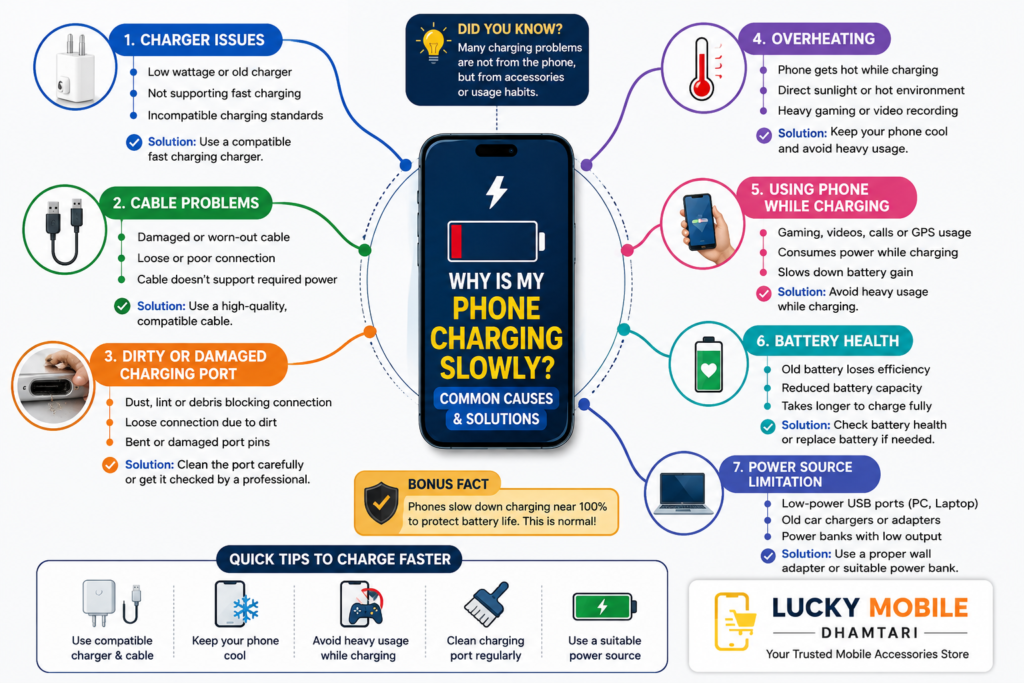
Why Is My Phone Charging Slowly? Common Causes and Solutions
Have you ever plugged your phone in to charge and noticed that the battery percentage is barely moving?
Slow charging can be frustrating, especially when you need your phone quickly. But in many cases, the problem is not with the smartphone itself.
The charger, charging cable, charging port, battery condition, temperature or even the way you use your phone while charging can affect charging speed.
In this guide, Lucky Mobile, Dhamtari, explains the common reasons why a phone may charge slowly and what you can do about them.
Why Is My Phone Charging Slowly?
Your smartphone does not charge using the charger alone. Several parts of the charging system work together.
These include:
- Smartphone
- Charger
- Charging cable
- Charging port
- Charging technology
- Battery
- Power source
- Phone temperature
If one of these is unsuitable or not working properly, charging performance can be affected.
1. Your Charger May Not Support Fast Charging
One of the most common reasons for slow charging is using a charger that does not provide enough power for your smartphone.
Modern smartphones support different charging speeds and technologies. If your phone supports fast charging but you use an older or lower-power charger, the phone may charge more slowly.
Before replacing your charger, check your phone’s charging specifications.
A higher wattage number alone does not guarantee faster charging. The charger must also be compatible with the smartphone’s supported charging technology.
2. Your Charging Cable Could Be the Problem
The charging cable is just as important as the charger.
A damaged or unsuitable cable can affect charging performance.
You may have a cable problem if:
- Charging is very slow
- Charging starts and stops
- The connector feels loose
- The cable is visibly damaged
- The cable does not support the required charging power
If your phone charges normally with another suitable cable, your original cable may be the reason.
For more information, check our guide on charging cables.
3. Dust or Dirt in the Charging Port
Your phone’s charging port can collect dust, lint and other small particles over time.
This can prevent the charging cable from making a proper connection.
You may notice:
- Loose connection
- Charging that stops and starts
- Cable not fitting properly
- Slow or inconsistent charging
Avoid using sharp metal objects to clean the charging port because they can damage the contacts.
If the port is heavily blocked or damaged, professional inspection may be safer.
4. Your Phone May Be Too Hot
Temperature can have a significant effect on charging.
When a smartphone becomes too hot, its charging system may reduce charging power to help control the temperature.
Your phone may become hot because of:
- Gaming while charging
- Direct sunlight
- Heavy video recording
- Running demanding applications
- Hot surroundings
- Continuous phone usage
If your phone feels unusually hot, stop heavy usage and allow it to cool naturally.
5. You Are Using the Phone While Charging
Using your smartphone heavily while charging can make it appear to charge slowly.
For example, gaming, watching videos, using GPS or recording video can consume a lot of power.
The phone is receiving power while also using power.
In simple terms:
Phone receives power → Battery gains energy
But:
Phone receives power → Phone uses energy → Less energy goes to the battery
For faster charging, avoid demanding activities while your phone is connected to the charger.
6. Your Battery May Be Getting Older
Smartphone batteries naturally lose capacity as they age and go through charging cycles.
An older battery may not perform exactly like a new battery.
You may notice:
- Shorter battery life
- Faster battery drain
- Longer charging
- Unexpected battery percentage changes
- More heat during charging
If you notice several of these symptoms together, checking the battery condition may be useful.
7. Charging Naturally Slows Near Full Battery
Many smartphones do not maintain their maximum charging speed throughout the entire charging process.
Charging can slow down as the battery approaches a high charge level.
This is normal.
The phone manages charging power to control temperature and battery stress.
So, slower charging near the end does not necessarily mean your charger or cable has a problem.
8. Your Phone May Have Battery Protection Features
Modern smartphones include software and hardware controls that manage charging.
Depending on the phone, charging may be adjusted according to:
- Battery level
- Temperature
- Charging habits
- Battery protection settings
- Phone usage
Some smartphones can also limit charging under certain conditions to help protect battery health.
This may sometimes make charging appear slower, but it is part of the phone’s charging management system.
9. The Power Source Can Affect Charging
Where you connect your charger can also make a difference.
A suitable wall charger may provide more charging power than some lower-power sources.
For example, charging from:
- A computer USB port
- An old car charger
- A low-power adapter
- Another low-power USB source
may be slower than using a suitable modern charger.
If you want faster charging, check the output specifications of your power source.
10. Your Power Bank May Have Limited Output
Power banks are useful when you are away from a power outlet, but not every power bank supports the same charging speed.
If your smartphone supports fast charging, the power bank also needs compatible output.
Check:
- Power bank output
- Charging standard
- USB-C support
- Cable capability
- Smartphone compatibility
A power bank with a large capacity does not automatically mean faster charging.
11. The Charging Port Could Be Damaged
If you have tried different suitable chargers and cables but your phone still charges slowly, the charging port itself could be the problem.
Possible signs include:
- Cable feels loose
- Charging stops when the cable moves
- Phone charges only at certain angles
- Frequent connection problems
- Charging repeatedly starts and stops
Do not force the cable into the port.
If these problems continue, professional inspection may be necessary.
How to Make Your Phone Charge Faster
There are several simple things you can try.
Use a Compatible Charger
Choose a charger that supports your smartphone’s charging requirements.
Use a Suitable Cable
Make sure the cable supports the required charging power and standard.
Avoid Heavy Usage
Try not to play games, record videos or run demanding applications while charging.
Keep Your Phone Cool
Keep the phone away from direct sunlight and excessive heat.
Check the Charging Port
Make sure the cable connects properly and the port is free from obvious dust or debris.
Use a Suitable Power Source
For faster charging, use an appropriate wall charger rather than a low-power USB source.
Should You Replace the Charger or Cable?
Before buying a replacement, try to identify the actual cause.
Start by testing another compatible cable.
If the problem continues, test another suitable charger.
If your phone charges normally with the new setup, you have likely found the problem.
If the phone remains slow with different suitable chargers and cables, the issue may be with the smartphone itself.
How to Choose the Right Charger
When choosing a replacement charger, don’t look only at wattage.
Consider:
- Charging standard
- Output power
- USB-C or USB-A port
- Smartphone compatibility
- Safety features
- Build quality
A compatible charger is more important than simply choosing the charger with the highest wattage.
How to Choose the Right Charging Cable
A good charging cable should match your phone and charger.
Check:
- Connector type
- Charging capability
- Data-transfer support
- Cable length
- Connector quality
- Durability
A cable that physically fits your phone may not necessarily support the charging performance you want.
When Should You Get Your Phone Checked?
If your phone continues to charge unusually slowly after trying suitable charging accessories, it may need inspection.
Professional help may be useful if:
- The charging port is damaged
- The phone becomes unusually hot
- Charging repeatedly stops
- The battery drains very quickly
- The phone only charges at certain angles
- The battery appears swollen
- You notice other unusual charging behaviour
If a battery is swollen or physically damaged, stop using the device and seek professional assistance.
Where to Get Charging Accessories in Dhamtari?
If you are looking for chargers, charging cables or power banks in Dhamtari, visit Lucky Mobile.
At Lucky Mobile, Dhamtari, customers can explore different mobile accessories according to their smartphone and charging requirements.
Before buying a charger or cable, it is helpful to know your exact smartphone model.
Why Choose Lucky Mobile in Dhamtari?
Choosing the right charging accessory can sometimes be confusing because different smartphones support different charging technologies.
At Lucky Mobile, we recommend looking at the complete charging setup:
- Smartphone
- Charger
- Cable
- Charging standard
- Power source
This helps you choose accessories that are suitable for your device rather than simply choosing based on appearance or wattage.
Frequently Asked Questions
Why is my phone charging slowly?
Slow charging can be caused by an unsuitable charger, poor-quality cable, dirty charging port, excessive heat, heavy phone usage, battery condition or charging protection features.
Can a charging cable make my phone charge slowly?
Yes. A damaged or unsuitable cable can limit charging performance.
Does a higher-watt charger always charge faster?
No. Your smartphone determines how much power it can accept. The charger must also support the appropriate charging technology.
Can dust in the charging port cause slow charging?
Yes. Dust and lint can interfere with the connection between the charging cable and port.
Why does my phone charge slowly when it gets hot?
A smartphone may reduce charging power when it becomes too warm to help manage temperature.
Is it okay to use my phone while charging?
Yes, but heavy activities such as gaming, video recording and navigation can make charging slower.
Can an old battery cause charging problems?
Battery ageing can affect overall battery and charging performance.
Can a power bank charge my phone quickly?
Yes, if the power bank supports the charging power and standard required by your smartphone.
When should I replace my charging cable?
Consider replacing it if it is damaged, loose, intermittently charging or no longer provides reliable performance.
Where can I buy chargers and cables in Dhamtari?
You can visit Lucky Mobile in Dhamtari to explore chargers, charging cables, power banks and other mobile accessories.
Conclusion
A phone that charges slowly does not always mean there is a serious problem with the smartphone.
The cause could be something as simple as an unsuitable cable, low-power charger, dirty charging port, excessive heat or heavy phone usage.
Start by checking the charger and cable, then look at the phone’s temperature, charging port and battery condition.
If the problem continues even after trying suitable charging accessories, consider having the phone inspected.
If you are looking for a suitable charger, charging cable or power bank in Dhamtari, visit Lucky Mobile and choose accessories that match your smartphone’s requirements.